Margarita Email Designer docs. Install it, ask for an email, ship it.
The free skill that turns a brand link, a folder of photos and your colors into Klaviyo-ready emails. How to install it in Claude, Claude Code and Google Antigravity, and everything it does once it runs.
Margarita Email Designer is a free, open-source skill for AI agents that turns a brand link, a folder of photos and your colors into Klaviyo-ready emails. You ask in plain language. It reads the site, picks the right email for the moment, writes the copy in the brand's voice, builds the HTML and checks it before you see it.
Get the ready-to-upload zip from the Margarita Email Designer page, or clone it from GitHub. It is MIT licensed: use it for your brand, your clients or your own tools.
01What Margarita does
Give your agent three things: the brand's website, a folder with the logo and product photos, and the hex colors. Margarita returns finished emails you can import into Klaviyo and send. Every product, price, offer and review comes from the site or your brief, word for word. If a fact is missing, the line is dropped, never made up.
It runs in Claude (web and desktop), Claude Code and Google Antigravity, and in any agent that reads SKILL.md skills. The build and checks are plain Python scripts that ship inside the skill.
02What you get
For every email, Margarita writes a folder with:
The template to import. Table layout, inline styles, an Outlook-safe button, dark-mode CSS and a 620px mobile breakpoint, under 102 KB.
A review copy. Sample values stand in for the Klaviyo tags, so you can read it like a subscriber. Never import this one.
The words. Subjects A and B with the variable being tested, preview text, the copy by block, alt text and the source of every fact.
klaviyo-import.zip. The HTML plus its images, ready for Klaviyo's template import.
Render screenshots. At 680, 375 and 320px, with images off and in dark mode.
For the whole run you also get notes.md (the brand profile, everything it had to infer, compliance flags and an import checklist), gallery.html (every email at desktop and phone width) and, when asked, a mockup and a Klaviyo build sheet for each sign-up popup.
03Install on Claude (web and desktop)
Step 1. In Settings → Capabilities, turn on code execution (Code execution and file creation, or Create and edit files in the newer layout). Margarita's checks are scripts, so they need it.
Step 2. Get the zip from the Margarita Email Designer page. It holds the margarita/ folder with SKILL.md inside, which is the layout Claude expects.
Step 3. Open Customize → Skills, click +, choose + Create skill, then Upload a skill, and select the zip.
Step 4. Check that its toggle is on, start a new chat and ask for an email. You do not need to name the skill.
Claude's code sandbox may not include Playwright, the browser the render check uses. If it cannot run, Margarita says so in notes.md, and you open preview.html in your own browser instead.
04Install in Claude Code
Claude Code reads skills from a folder. Clone the repository into your skills folder, for every project or for one:
# for all your projects
git clone https://github.com/yenderfonseca/margarita \
  ~/.claude/skills/margarita

# or for one project only
git clone https://github.com/yenderfonseca/margarita \
  .claude/skills/margarita
If you downloaded the zip instead, unzip it into ~/.claude/skills/ so the file sits at ~/. Start a new session. The skill loads when your request fits, or type /margarita.
05Install in Google Antigravity
Antigravity reads the same SKILL.md format. Put the folder in its global skills folder, or in one workspace:
# for all your workspaces
git clone https://github.com/yenderfonseca/margarita \
  ~/.gemini/config/skills/margarita

# or for one workspace only
git clone https://github.com/yenderfonseca/margarita \
  .agents/skills/margarita
Older Antigravity IDE installs also read ~/. The agent picks the skill up from its description, or you can name it in your prompt; in the App, type /margarita. In the CLI, run /skills reload after installing. In the IDE, it appears under Customizations in the agent side panel.
Several agents on one machine
Clone once and link the folder into each agent, so every agent runs the same copy and one git pull updates them all:
git clone https://github.com/yenderfonseca/margarita \
  ~/code/margarita
ln -s ~/code/margarita ~/.claude/skills/margarita
ln -s ~/code/margarita ~/.gemini/config/skills/margarita06Use it
Ask the way you would ask a designer. A few examples:
Make a welcome series for https://example-brand.com. Photos are in
~/Desktop/brand-photos, colors #1F1B16, #F5F1EA and #A34A28.

Launch email for our new hoodie: https://example-brand.com/products/hoodie

Show me email styles for my candle shop, https://example-candles.com

Black Friday campaign, 20% off with code FRIDAY20, ends Sunday at midnight.The brand website. A link or an asset folder is needed. Without a link, every voice and product cue is marked as inferred.
An asset folder. Optional. Without it, Margarita uses the site's own images, or builds text-led emails.
Your palette in hex. Recommended. Without it, it takes the colors the site uses and logs them as inferred. It never invents colors.
Anything else. Campaign type, audience, style, offer, banned words, output folder. All optional; each decision it makes is noted.
It stops to ask only when there is no link, no assets and no brief that names the brand. Otherwise it delivers, then lists what you should check.
07How it works
- Read the request: link, photos, palette, brief and where to save.
- Intake: read the site and save each page as evidence, inventory the photos, map your colors to roles with a 4.5:1 contrast check, and print a one-line status.
- Decide: the niche, the occasion or flow, the style, how many emails and for whom.
- Reference lookup (optional): with a Margarita library server connected, pull two or three reference emails for layout cues only.
- Write: subjects A and B, preview text, the copy for each block, alt text and one call to action, each fact with its source.
- Build: everything goes into one spec file, and the build renders the emails, copies the images, writes the import zip and runs the linter.
- Check: screenshots at three widths, with images off and in dark mode, measured for overflow, orphan words, broken images, button size and unreadable text. Then the agent looks at them itself.
- Popups: when asked, mockups and Klaviyo build sheets for sign-up forms.
- Report: one line per email, what it inferred, compliance flags and the assumptions you can change.
08The checks that block an email
An email that fails any of these is not delivered. They are enforced by the build and the linter, not left to taste.
Only sourced facts. Products, prices, offers, codes, deadlines, reviews and policies come from the site, the photos or your brief.
Your colors, locked. Every color is yours or a logged mix of yours, and roles that fail 4.5:1 contrast stop the build.
One idea, one button. One primary call to action and three to six body blocks per email.
Correct tags. Unsubscribe, preferences and web-view tags, the organization address, a default for every first name, balanced tags.
Works everywhere. Tables, inline styles, an Outlook button, a mobile breakpoint, 48px taps, no scripts or forms.
Still readable. Live-text headlines and offers, styled alt text and a background color behind every image.
House rules. No em or en dashes, straight quotes, no stacked exclamation marks, no orphan words, room above the button.
The niche's rules. Alcohol, supplements, CBD, finance, kids and eco claims follow each niche's compliance notes.
09Styles, blocks, niches and flows
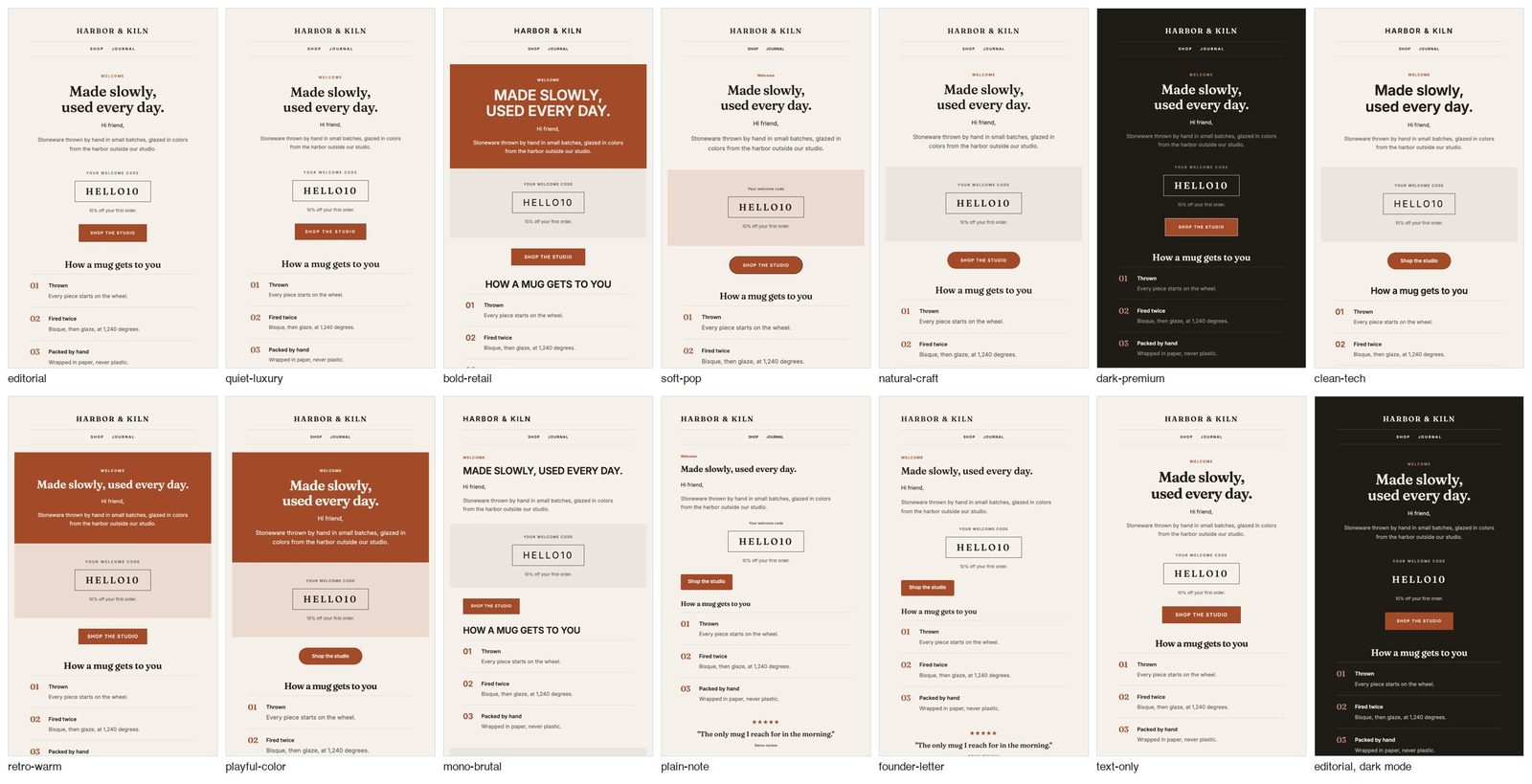
13 styles. Editorial, quiet luxury, bold retail, soft pop, natural craft, dark premium, clean tech, retro warm, playful color, mono brutalist, plain note, founder letter and text only. A style sets shape, type and rhythm, never colors: those always come from your palette. Ask to see options and it builds the first email in two or three styles side by side.
31 blocks, from heroes, stories and product grids to reviews, coupon codes, comparison tables, FAQs, a Klaviyo checkout loop for cart emails and three footers.
56 niches in 10 groups (beauty, fashion, food, home, lifestyle, outdoor, pets, services, tech and wellness), each with the opener that works there, its best styles and its compliance notes.
Occasions and flows: calendar moments such as Black Friday, holiday gift guides, Valentine's Day and Mother's Day; product moments such as launches and back in stock; and the welcome, abandoned checkout, browse abandonment, post-purchase and winback flows, with timing for each email.
8 sign-up form designs for Klaviyo's own form builder: welcome offer, newsletter without a discount, exit intent, email then SMS, birthday capture, waitlist, holiday early access and preference quiz.
10Command line
The scripts need only Python 3.9 or newer. Playwright is optional and used only by the render check. Every script prints its usage with --help.
S=~/.claude/skills/margarita/scripts

# build every email in a spec, then lint each one
python3 $S/build.py spec.json --out out/brand
# the same emails in other styles, for comparison
python3 $S/build.py spec.json --out out/brand --styles all
# list styles and blocks
python3 $S/build.py --list

# lint one email, or check two colors
python3 $S/preflight.py --html email.html --subject "Subject A" --preheader "Preview"
python3 $S/preflight.py contrast "#1F1B16" "#F5F1EA"

# screenshots and layout checks
python3 $S/render.py out/brand/01-welcome/email.html
# one page with every email, and popup mockups
python3 $S/gallery.py out/brand
python3 $S/popup.py spec.json --out out/brand
To confirm an install works, run both self-tests from the skill folder:
python3 scripts/build.py --self-test
python3 scripts/preflight.py --self-test
The README on GitHub documents every spec field and flag.
11Import into Klaviyo
- Templates: create a template, choose Import, and upload
klaviyo-import.zip. - Organization: set your organization name and address in Klaviyo. The footer reads both.
- Coupons: create every coupon the emails reference, for example
{% coupon_code 'WELCOME10' %}. - Flows: use the timing and filters listed in
notes.md. - Forms: follow each popup's build sheet in Klaviyo's form editor.
- Test: send each email to a real inbox, including Gmail and Outlook, in light and dark mode.
12Quick answers
Is Margarita Email Designer free?
Yes. It is open source under the MIT license. Use it for your own brand, for client work or inside your own tools.
Does it send emails or connect to my Klaviyo account?
No. It builds the files. You import the template into Klaviyo and send it from there, so nothing reaches your list without you.
Will it make up a discount, a price or a review?
No. Every claim comes from your site or your brief and is listed with its source in email.md. A block whose facts are missing is dropped.
Does it work with platforms other than Klaviyo?
The HTML is standard, client-safe email HTML, but the merge and legal tags use Klaviyo's syntax. For another platform, swap those tags and run that platform's own checks.
Which agents can run it?
Claude on the web and desktop, Claude Code and Google Antigravity, plus any agent that reads SKILL.md skills.